
Difficulty Level = 1 [What’s this?]
How fast can you press a button once a timer starts counting? Find out by attaching a button to your Arduino and the Digit Shield. A simple tactile button switch is connected to digital pin 8 and ground.
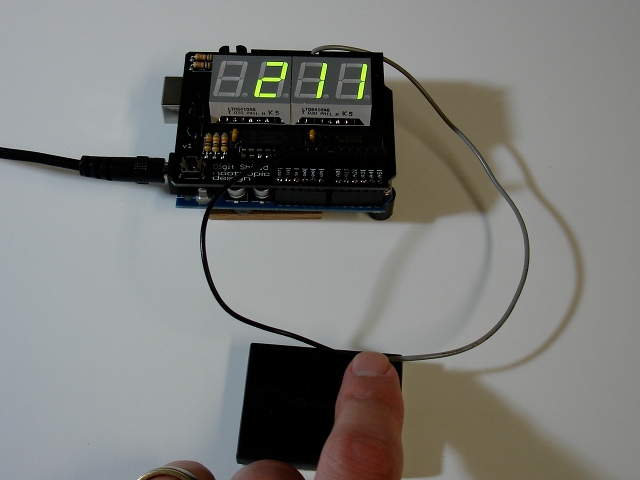
Press the button once to start the sequence. First the Arduino will wait a random amount of time between 2 and 5 seconds, then it will start counting milliseconds on the display. As soon as you see the numbers start, press the button again to stop the count. Then repeat: press the button again to clear the display and start the random wait before the numbers start counting again.
Here is the complete code:
#include <DigitShield.h>
#define BUTTON 8

unsigned long start, stop;

void setup() {
  randomSeed(analogRead(0));

  pinMode(8, INPUT);
  digitalWrite(8, HIGH);

  DigitShield.begin();
  DigitShield.setBlank(true);
}

void loop() {
  // wait until button press
  while (digitalRead(BUTTON) == HIGH);

  // turn off the display
  DigitShield.setBlank(true);

  // delay from 2 to 5 seconds
  delay(random(2000, 5000));
  start = millis();
  DigitShield.setBlank(false);

  while (true) {
    DigitShield.setValue((int)(millis() - start));
    if (digitalRead(BUTTON) == LOW) {
      stop = millis();
      break;
    }
  }

  DigitShield.setValue((int)(stop-start));
  delay(1000);
}


Michael–fantastic instruction to build shield, worked right away, ran through all programs, great for a relative newcomer like me but I did pick up on your test of not including at the beginning of this reaction timer. After that it works fine. Look forward to more great products from you, keep me on your newsletter if you start one! JD
Thx for the feedback — the #include was not a test, it was my blog software messing up the code. Fixed.
I want to modify this project a little. What do I need to do to get an LED to light up at same time clock starts counting down?
If you answer this post please keep in mind I know very little about arduino and programing.
Thanks.
First you’d connect an LED to one of the Arduino output pins with an appropriately sized resistor. Let’s say it’s pin 13.
In setup(), include the line:
pinMode(13, OUTPUT);digitalWrite(13, LOW);
Just before the while (true) loop, turn on the LED just before starting the countdown:
digitalWrite(13, HIGH);And just after the while loop, turn the LED off:
digitalWrite(13, LOW);Thanks Michael! Circuit and code works great.
Hi I built a digit shield for a reaction timer I cut and pasted the code but during the check stage it came back as DigitShield was not declared in this scope.
Could you tell me how to fix?
Thanks
Al Buck
You need to install the Digit Shield library. See the product page for information about the library and how to use it.
http://www.nootropicdesign.com/digitshield/
Is there a way to make it start counting on someones command? Like a 12v input for a trigger?
Autohabit, yes you could trigger an input pin on a voltage HIGH condition (5V) instead of a switch that connects the pin to ground. Simple code change. 5V is max because that’s the operating voltage.
Awesome! Thank you so much!
So exactly what would i have to purchase to complete this project?
This project uses our Digit Shield that we sell in our store. It requires an Arduino board of course.
Does it matter what board i use?
Autohabit: Uno or Duemilanove or compatible.
Do you have any good suggestions on a case that fits both boards?
Here’s one: https://www.sparkfun.com/products/10088
You’d have to cut out some of the face so you can see the display.
If you google for “Arduino enclosure” you’ll find other options.
I need help with writing the code to eliminate the random start function. Instead initiating it with button 9 and still using button 8 to stop it. Here is the catch i want it to display a negative time if the stop button is pressed before the start button.
I think you will get more feedback if you post to the forum instead of the blog. http://nootropicdesign.com/forum/viewforum.php?f=42
Also, you can’t display a negative with this display.
I’m trying to display the time in seconds rather than milliseconds. This is what I have so far but it’s not displaying correctly.
DigitShield.setPrecision(2);
DigitShield.setValue((int)(stop-start)/1000);
If I have a reaction time of 1624 milliseconds, I was hoping to get 1.62 to display however it only displays 1.0. If the the reaction time is 2292 milliseconds the display is 2.0. I don’t know why it’s rounding down.
Any ideas on what I’m doing wrong?
Thanks.
Rich, it is displaying an integer because you are casting the value to an int. That truncates 1.62 to 1. Use
DigitShield.setValue((float)(stop-start)/1000.0);
Does exist a port of DigitShield for ChipKit Max32?
no, not at this time.